Prosicht AutoLabel
Space for the image. Focus on the workflow.
Prosicht Technology · Sakarya University Technopark · Team project
Completed · In active internal use
The problem behind it.
Prosicht AutoLabel combines manual drawing tools, SAM3-assisted object selection and YOLO export in one annotation studio. During my internship, I worked on the interface, interactions and theme system.
As annotation tools and panels multiply, the image can lose space. The workspace needed to keep a rich toolset accessible while preserving focus on the image.
I developed a compact canvas-first layout, on-demand panels and a consistent theme system. The React interface integrates with a FastAPI backend through REST APIs; my contribution focused on the frontend.
- React 18
- JavaScript ES6+
- JSX
- Vite
- Tailwind CSS
- Zustand
- Canvas 2D
- React Portal
- REST API
- YOLO
- SAM3
What I built.
Canvas-first layout
I developed panels for labels, attributes, model predictions, tracking, comments and history that adjust the canvas layout rather than cover the image.
Compact toolset
I contributed to the interface of a 12-tool workspace combining pan, selection, boxes, polygons, keypoints, SAM3-assisted selection and editing.
18 theme combinations
I developed an HSL theme engine combining nine color families with light and dark modes, managing surfaces, borders and accents through central CSS variables.
Menus that fit the screen
I used React Portal to solve menus clipped by tables and cards, calculating positions against viewport limits and opening upward when needed.
Projects, administration and export
I worked on project filters, progress charts, user management and role assignment. I developed the YOLO export wizard with folder layout, filter and range options.
Inside the product.
Captured from the application. Open a screen to explore it in full.
Behind the decisions.
Two-axis theme model
Color family and light/dark appearance are independent, with theme values applied before the first paint.
Central state management
I used Zustand to manage shared interface states.
Panels and canvas together
Opening panels adjust the available canvas space rather than obscure the image.
Menus beyond clipping boundaries
React Portal and dynamic positioning separate menus from ancestor overflow limits.
A small interaction to try.
A standalone concept demo with sample data.
ProSicht
AutoLabel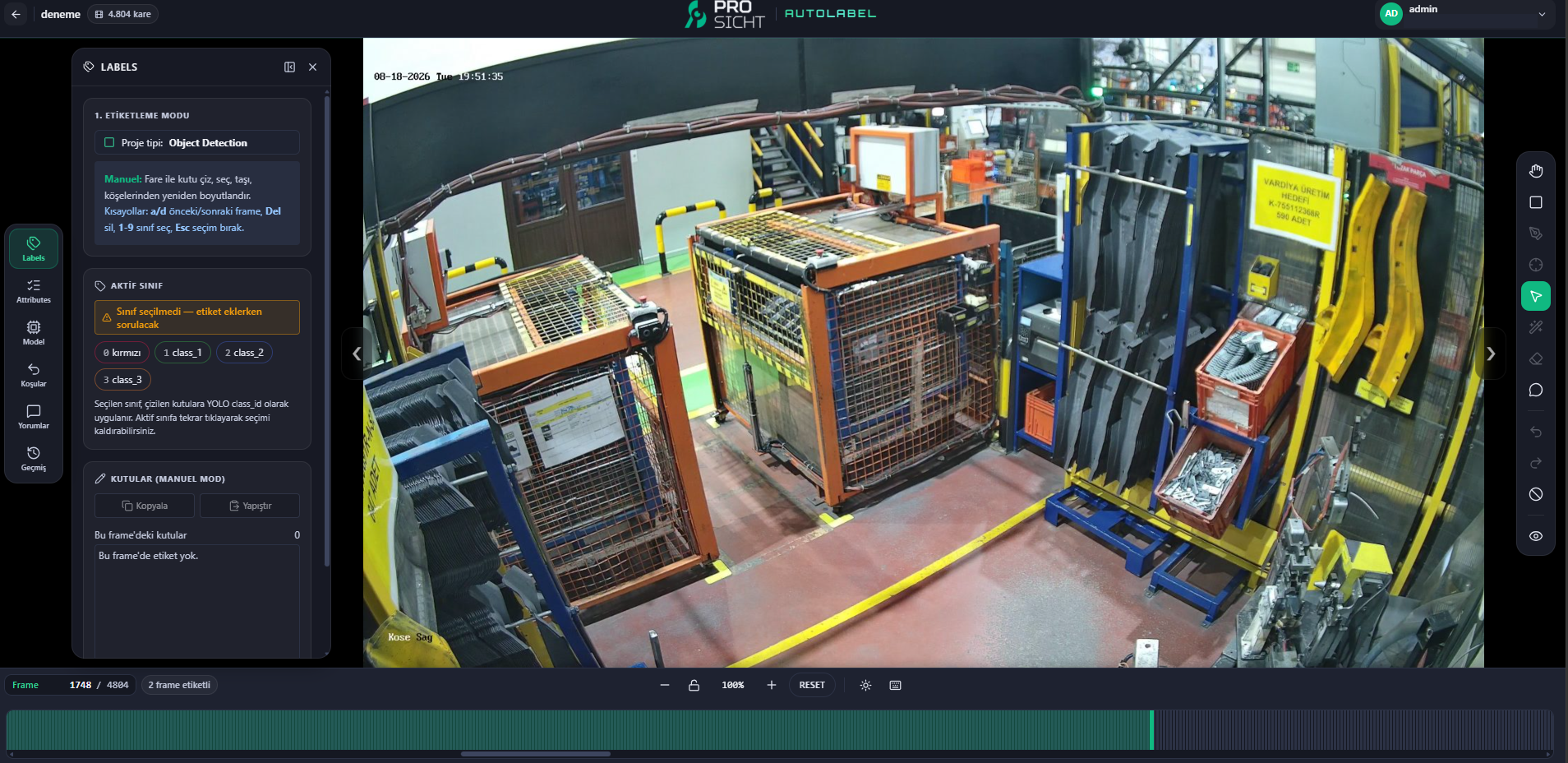
Three sample boxes are ready. Select one to move it, or draw a new box.
Labels, coordinates & export
Label list
3 annotationsBox coordinates
Annotation output
Coordinates are normalized to the complete 1367 × 766 factory frame. Select the output text to copy it.
Class IDs: 0 = Transport cage · 1 = Workstation
The panoramic view preserves the original proportions. Exports use the complete factory frame.
Keyboard: select a label in the list, use arrow keys to move it (Shift: 10 px), Delete to remove it, Ctrl / ⌘ Z to undo, and Escape to cancel a gesture or clear selection.
Interactive local demo. The image is from ProSicht AutoLabel; the annotations are examples. No model runs and no file is uploaded.
What stayed with me.
Keeping a multi-tool interface simple requires layout, state management and small interaction decisions to be resolved together.
Rudder Cloud
Next project